Usability Testing
Taco Bell Usability Testing
Analyzed Taco Bell’s website for usability challenges. Recommended improvements to optimize the ordering process.
Year :
2025
Industry :
Food
Client :
Taco Bell
Project Duration :
7 weeks
INTRODUCTION:
For this project, I worked with my team to conduct a comprehensive usability study of Taco Bell’s website. Our goal was to evaluate how well the site supports core customer tasks such as ordering food for pickup or delivery, browsing deals, and finding store locations.
We began with a heuristic evaluation, followed by structured usability testing with 8 participants, using a screener and moderator script to ensure consistency. The study uncovered both strengths and critical usability barriers, leading to actionable recommendations that were praised by our professor for their clarity and depth.
Challenge:
Coordinating schedules across multiple participants while ensuring each task ran smoothly within a strict timetable.
Managing technical difficulties like finding stable Wi-Fi for consistent test sessions.
Synthesizing a large volume of qualitative and quantitative data from 8 sessions into clear, prioritized insights.
Results:
Delivered a detailed usability report, confirming heuristic issues through real user data and identifying additional barriers in menu navigation, order customization, and delivery vs pickup flows.
Presented prioritized recommendations to streamline the ordering process, significantly improving users' confidence and reducing confusion around key tasks.
Process:
Goals & Objectives:
Identify usability issues: Validate earlier heuristic problems and uncover new issues through user testing.
Measure satisfaction & completion: Record success rates, completion times, errors, and direct user quotes.
Provide actionable improvements: Help Taco Bell improve online ordering efficiency and customer satisfaction.
Heuristic Evaluation:
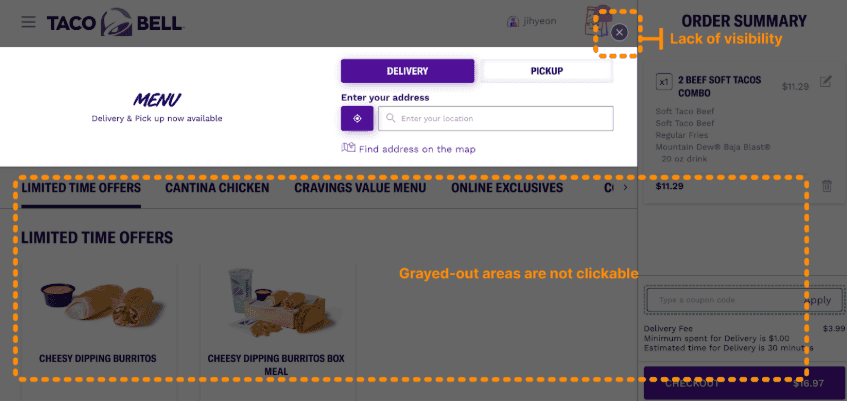
Before conducting live tests, we ran a comprehensive heuristic analysis using Nielsen’s 10 principles, uncovering:
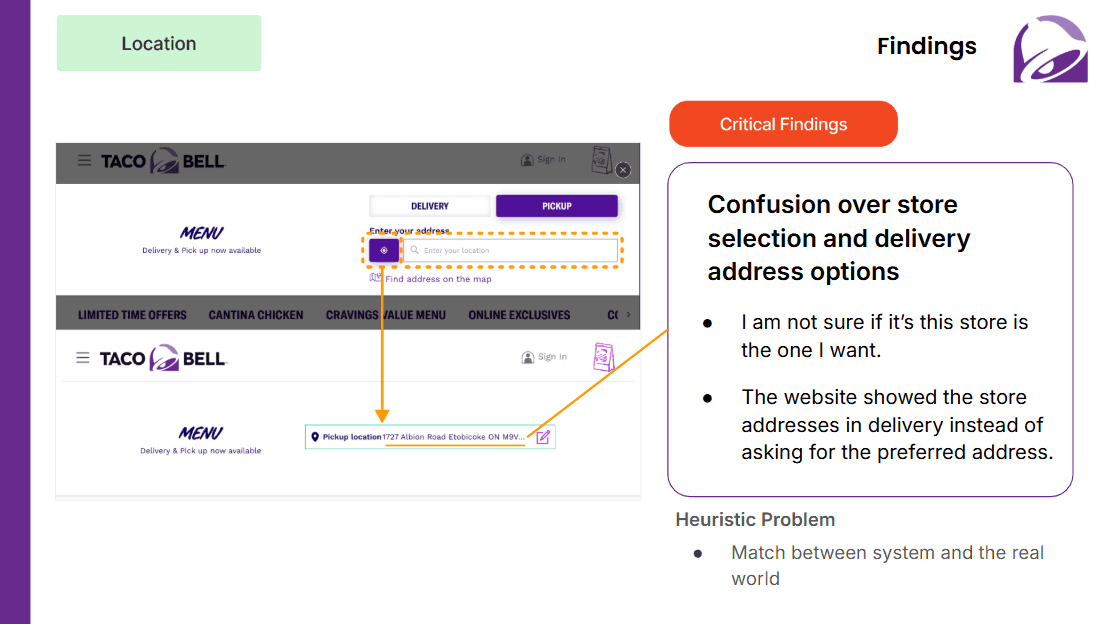
Confusing delivery vs pickup interactions (violating Visibility of System Status and User Control & Freedom).
Overwhelming customization interfaces (Recognition vs Recall).
Missing search features (Consistency & Standards).
These findings directly shaped the tasks and hypotheses we tested.
Check out our detailed report » https://docs.google.com/document/d/1qkxvl1LSFiPceYhbE5TIV1eko_ELLlEWBxVmMn9x3Go/edit?tab=t.r080eti1ccn5
Participants & Screening:
8 participants with varied online food ordering experience (weekly to occasional users).
Recruited via a detailed screener questionnaire that filtered for diversity in ordering habits, while excluding tech industry professionals to avoid bias.
Moderator Script & Remote Testing Setup:
We created a structured moderator script to guide each session, ensuring that all participants received the same instructions, scenario introductions, and follow-up questions.
Testing was conducted remotely, with participants completing tasks on their own devices from their natural environments. This allowed us to capture authentic behaviors and contexts, such as participants multitasking at home or dealing with their typical internet speeds.
Each session was observed via screen sharing and voice calls, enabling us to take detailed notes, record direct quotes, and watch how users naturally navigated Taco Bell’s website.
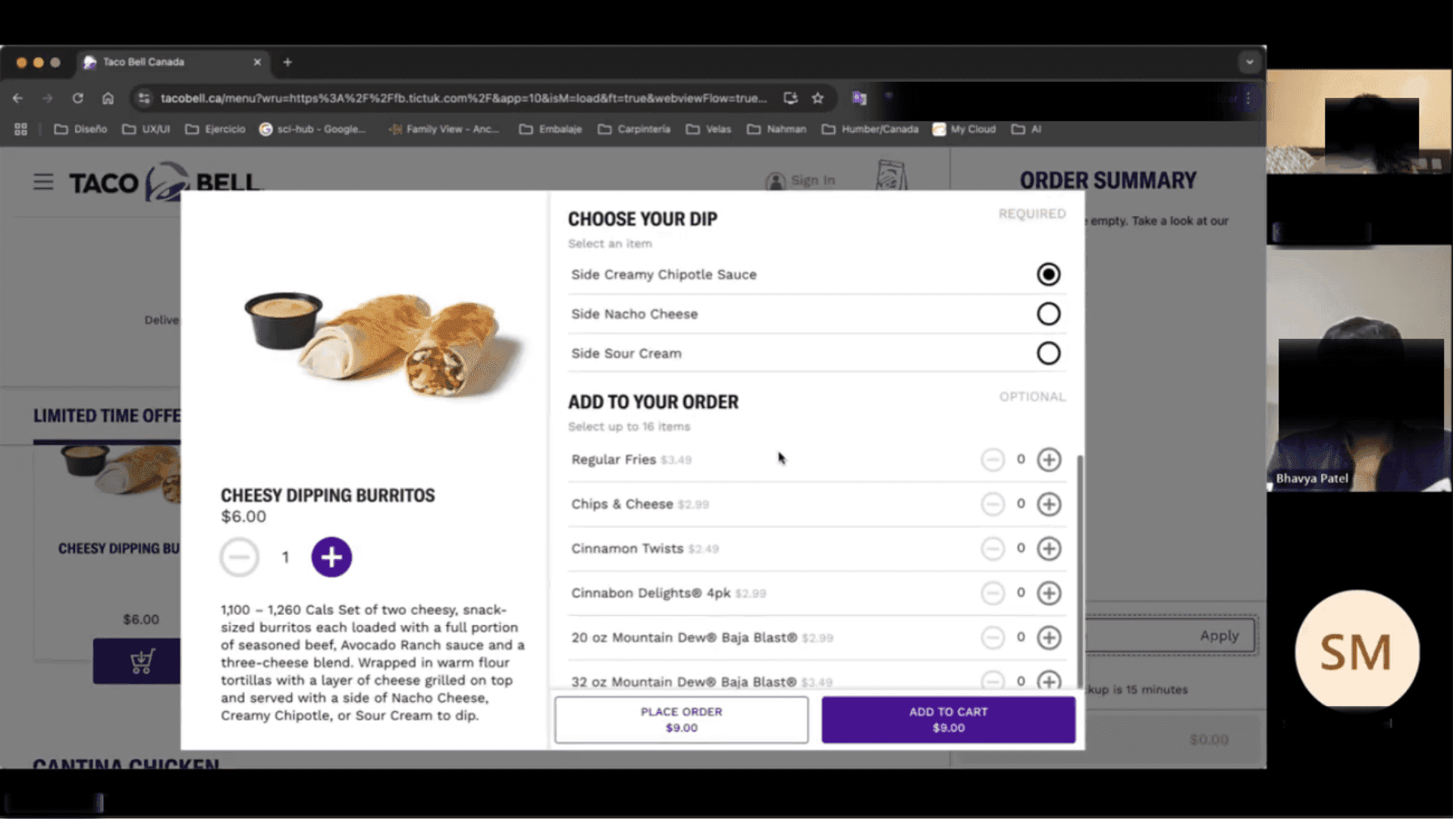
TASK SCENARIOS:
Participants were asked to complete realistic tasks mirroring key user goals:
Order for pickup: Customize a Cheesy Dipping Burrito Box.
Order vegetarian delivery: Add sides & complete checkout.
Find nearest store: For meeting friends.
Check discounts & deals: Applying them during checkout.
Each task ended with a self-rated satisfaction score (1-10), providing immediate quantitative feedback.
High Level Summary:
High Level Summary:
Before diving into data analysis, we created a structured high-level summary document to organize all observations from the usability sessions. This included:
Session-wise summaries highlighting key behaviors, challenges, and successes.
Positive & negative findings separated for clarity, ensuring we could easily identify strengths and pain points.
Direct user quotes to capture authentic feedback in the users’ own words.
Notes on unexpected user actions, which informed our hypothesis for design improvements.
This step helped us stay organized and identify emerging patterns early, making the card-sorting and severity ranking process much faster and more accurate.
Data Collection & Analysis:
We did our data analysis through card sorting technique. First we created the cards for all of the finding from the sessions, then we piled up the cards which had the similar issues or findings. We divided this piled up cards by severity level.
For this we divided them by the numbers of the cards each pile have:
Critical: 4 or more cards in the pile.
Serious: 3 cards in the pile
Minor: 2 or less cards
Positive: The user appreciated the system.
(Some piles were added to different categories based on the importance not the numbers of cards. *)
The criteria were chosen because the more cards a pile have means the more users faced that problem.
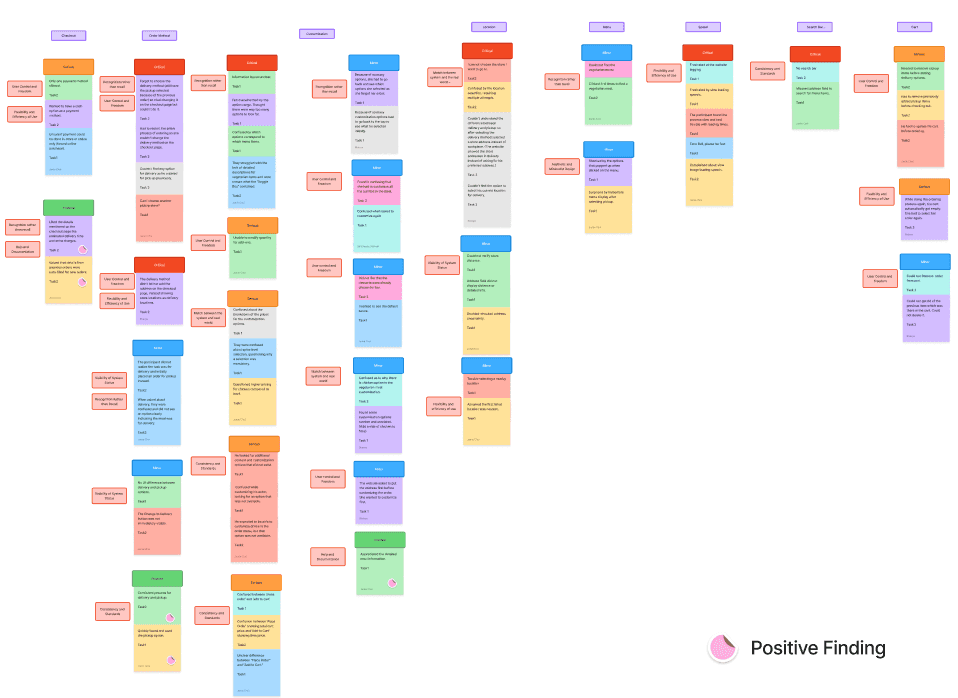
For a closer look, check it out in Figjam» https://www.figma.com/board/DBibxB7kVyokbL2wv66bDX/Data-Analysis---Usability-Testing?node-id=60-1761&t=mELyWgtpw4GpPskd-1
Key Findings:
Severity | Examples of Issues |
|---|---|
Critical | Switching from pickup to delivery emptied carts without warning; no clear address distance info; slow site performance. |
Serious | Overloaded customization screens; hard to find vegetarian options; lacked multiple payment methods. |
Minor | Some confusing UI elements; bland visual design. |
Positive | Clear checkout page with estimated delivery times & charges, appreciated auto-filling of details. |
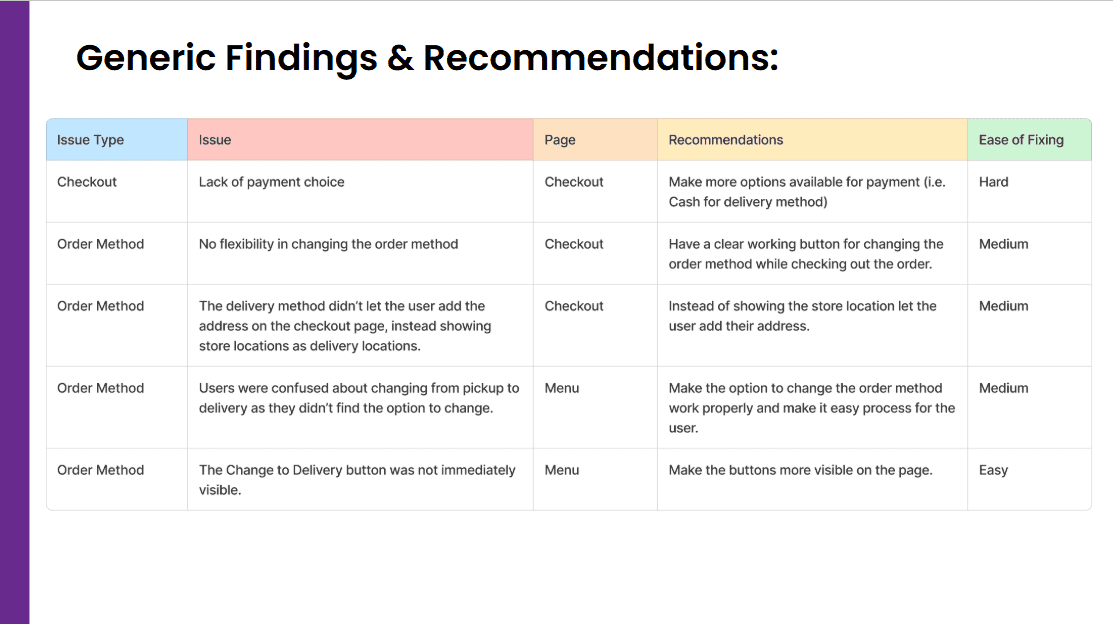
Generic Recommendations
Implement a clear search bar so users don’t misuse the address field for food searches.
Ensure consistent cart behavior when switching order modes.
Streamline customization to avoid overwhelming screens.
Improve load speeds and add clear location distances.
Conclusion:
This project reinforced how critical it is to validate assumptions with real users. While Taco Bell’s site had strengths like a clear checkout process, we uncovered major barriers - confusing pickup vs delivery flow, lack of a search bar, and overwhelming customization screens. Our structured process, from heuristic evaluation to remote usability sessions and card sorting, gave us actionable insights that, if implemented, would greatly improve task success and satisfaction.
What I'd Do Differently:
Add a quick prototype testing phase after analysis to validate fixes.
Include tasks for loyalty programs and deals, since users valued discounts.
Gather more quantitative metrics like SUS scores for stronger benchmarking.
Usability Testing
Taco Bell Usability Testing
Analyzed Taco Bell’s website for usability challenges. Recommended improvements to optimize the ordering process.
Year :
2025
Industry :
Food
Client :
Taco Bell
Project Duration :
7 weeks
INTRODUCTION:
For this project, I worked with my team to conduct a comprehensive usability study of Taco Bell’s website. Our goal was to evaluate how well the site supports core customer tasks such as ordering food for pickup or delivery, browsing deals, and finding store locations.
We began with a heuristic evaluation, followed by structured usability testing with 8 participants, using a screener and moderator script to ensure consistency. The study uncovered both strengths and critical usability barriers, leading to actionable recommendations that were praised by our professor for their clarity and depth.
Challenge:
Coordinating schedules across multiple participants while ensuring each task ran smoothly within a strict timetable.
Managing technical difficulties like finding stable Wi-Fi for consistent test sessions.
Synthesizing a large volume of qualitative and quantitative data from 8 sessions into clear, prioritized insights.
Results:
Delivered a detailed usability report, confirming heuristic issues through real user data and identifying additional barriers in menu navigation, order customization, and delivery vs pickup flows.
Presented prioritized recommendations to streamline the ordering process, significantly improving users' confidence and reducing confusion around key tasks.
Process:
Goals & Objectives:
Identify usability issues: Validate earlier heuristic problems and uncover new issues through user testing.
Measure satisfaction & completion: Record success rates, completion times, errors, and direct user quotes.
Provide actionable improvements: Help Taco Bell improve online ordering efficiency and customer satisfaction.
Heuristic Evaluation:
Before conducting live tests, we ran a comprehensive heuristic analysis using Nielsen’s 10 principles, uncovering:
Confusing delivery vs pickup interactions (violating Visibility of System Status and User Control & Freedom).
Overwhelming customization interfaces (Recognition vs Recall).
Missing search features (Consistency & Standards).
These findings directly shaped the tasks and hypotheses we tested.
Check out our detailed report » https://docs.google.com/document/d/1qkxvl1LSFiPceYhbE5TIV1eko_ELLlEWBxVmMn9x3Go/edit?tab=t.r080eti1ccn5
Participants & Screening:
8 participants with varied online food ordering experience (weekly to occasional users).
Recruited via a detailed screener questionnaire that filtered for diversity in ordering habits, while excluding tech industry professionals to avoid bias.
Moderator Script & Remote Testing Setup:
We created a structured moderator script to guide each session, ensuring that all participants received the same instructions, scenario introductions, and follow-up questions.
Testing was conducted remotely, with participants completing tasks on their own devices from their natural environments. This allowed us to capture authentic behaviors and contexts, such as participants multitasking at home or dealing with their typical internet speeds.
Each session was observed via screen sharing and voice calls, enabling us to take detailed notes, record direct quotes, and watch how users naturally navigated Taco Bell’s website.
TASK SCENARIOS:
Participants were asked to complete realistic tasks mirroring key user goals:
Order for pickup: Customize a Cheesy Dipping Burrito Box.
Order vegetarian delivery: Add sides & complete checkout.
Find nearest store: For meeting friends.
Check discounts & deals: Applying them during checkout.
Each task ended with a self-rated satisfaction score (1-10), providing immediate quantitative feedback.
High Level Summary:
High Level Summary:
Before diving into data analysis, we created a structured high-level summary document to organize all observations from the usability sessions. This included:
Session-wise summaries highlighting key behaviors, challenges, and successes.
Positive & negative findings separated for clarity, ensuring we could easily identify strengths and pain points.
Direct user quotes to capture authentic feedback in the users’ own words.
Notes on unexpected user actions, which informed our hypothesis for design improvements.
This step helped us stay organized and identify emerging patterns early, making the card-sorting and severity ranking process much faster and more accurate.
Data Collection & Analysis:
We did our data analysis through card sorting technique. First we created the cards for all of the finding from the sessions, then we piled up the cards which had the similar issues or findings. We divided this piled up cards by severity level.
For this we divided them by the numbers of the cards each pile have:
Critical: 4 or more cards in the pile.
Serious: 3 cards in the pile
Minor: 2 or less cards
Positive: The user appreciated the system.
(Some piles were added to different categories based on the importance not the numbers of cards. *)
The criteria were chosen because the more cards a pile have means the more users faced that problem.
For a closer look, check it out in Figjam» https://www.figma.com/board/DBibxB7kVyokbL2wv66bDX/Data-Analysis---Usability-Testing?node-id=60-1761&t=mELyWgtpw4GpPskd-1
Key Findings:
Severity | Examples of Issues |
|---|---|
Critical | Switching from pickup to delivery emptied carts without warning; no clear address distance info; slow site performance. |
Serious | Overloaded customization screens; hard to find vegetarian options; lacked multiple payment methods. |
Minor | Some confusing UI elements; bland visual design. |
Positive | Clear checkout page with estimated delivery times & charges, appreciated auto-filling of details. |
Generic Recommendations
Implement a clear search bar so users don’t misuse the address field for food searches.
Ensure consistent cart behavior when switching order modes.
Streamline customization to avoid overwhelming screens.
Improve load speeds and add clear location distances.
Conclusion:
This project reinforced how critical it is to validate assumptions with real users. While Taco Bell’s site had strengths like a clear checkout process, we uncovered major barriers - confusing pickup vs delivery flow, lack of a search bar, and overwhelming customization screens. Our structured process, from heuristic evaluation to remote usability sessions and card sorting, gave us actionable insights that, if implemented, would greatly improve task success and satisfaction.
What I'd Do Differently:
Add a quick prototype testing phase after analysis to validate fixes.
Include tasks for loyalty programs and deals, since users valued discounts.
Gather more quantitative metrics like SUS scores for stronger benchmarking.
Usability Testing
Taco Bell Usability Testing
Analyzed Taco Bell’s website for usability challenges. Recommended improvements to optimize the ordering process.
Year :
2025
Industry :
Food
Client :
Taco Bell
Project Duration :
7 weeks
INTRODUCTION:
For this project, I worked with my team to conduct a comprehensive usability study of Taco Bell’s website. Our goal was to evaluate how well the site supports core customer tasks such as ordering food for pickup or delivery, browsing deals, and finding store locations.
We began with a heuristic evaluation, followed by structured usability testing with 8 participants, using a screener and moderator script to ensure consistency. The study uncovered both strengths and critical usability barriers, leading to actionable recommendations that were praised by our professor for their clarity and depth.
Challenge:
Coordinating schedules across multiple participants while ensuring each task ran smoothly within a strict timetable.
Managing technical difficulties like finding stable Wi-Fi for consistent test sessions.
Synthesizing a large volume of qualitative and quantitative data from 8 sessions into clear, prioritized insights.
Results:
Delivered a detailed usability report, confirming heuristic issues through real user data and identifying additional barriers in menu navigation, order customization, and delivery vs pickup flows.
Presented prioritized recommendations to streamline the ordering process, significantly improving users' confidence and reducing confusion around key tasks.
Process:
Goals & Objectives:
Identify usability issues: Validate earlier heuristic problems and uncover new issues through user testing.
Measure satisfaction & completion: Record success rates, completion times, errors, and direct user quotes.
Provide actionable improvements: Help Taco Bell improve online ordering efficiency and customer satisfaction.
Heuristic Evaluation:
Before conducting live tests, we ran a comprehensive heuristic analysis using Nielsen’s 10 principles, uncovering:
Confusing delivery vs pickup interactions (violating Visibility of System Status and User Control & Freedom).
Overwhelming customization interfaces (Recognition vs Recall).
Missing search features (Consistency & Standards).
These findings directly shaped the tasks and hypotheses we tested.
Check out our detailed report » https://docs.google.com/document/d/1qkxvl1LSFiPceYhbE5TIV1eko_ELLlEWBxVmMn9x3Go/edit?tab=t.r080eti1ccn5
Participants & Screening:
8 participants with varied online food ordering experience (weekly to occasional users).
Recruited via a detailed screener questionnaire that filtered for diversity in ordering habits, while excluding tech industry professionals to avoid bias.
Moderator Script & Remote Testing Setup:
We created a structured moderator script to guide each session, ensuring that all participants received the same instructions, scenario introductions, and follow-up questions.
Testing was conducted remotely, with participants completing tasks on their own devices from their natural environments. This allowed us to capture authentic behaviors and contexts, such as participants multitasking at home or dealing with their typical internet speeds.
Each session was observed via screen sharing and voice calls, enabling us to take detailed notes, record direct quotes, and watch how users naturally navigated Taco Bell’s website.
TASK SCENARIOS:
Participants were asked to complete realistic tasks mirroring key user goals:
Order for pickup: Customize a Cheesy Dipping Burrito Box.
Order vegetarian delivery: Add sides & complete checkout.
Find nearest store: For meeting friends.
Check discounts & deals: Applying them during checkout.
Each task ended with a self-rated satisfaction score (1-10), providing immediate quantitative feedback.
High Level Summary:
High Level Summary:
Before diving into data analysis, we created a structured high-level summary document to organize all observations from the usability sessions. This included:
Session-wise summaries highlighting key behaviors, challenges, and successes.
Positive & negative findings separated for clarity, ensuring we could easily identify strengths and pain points.
Direct user quotes to capture authentic feedback in the users’ own words.
Notes on unexpected user actions, which informed our hypothesis for design improvements.
This step helped us stay organized and identify emerging patterns early, making the card-sorting and severity ranking process much faster and more accurate.
Data Collection & Analysis:
We did our data analysis through card sorting technique. First we created the cards for all of the finding from the sessions, then we piled up the cards which had the similar issues or findings. We divided this piled up cards by severity level.
For this we divided them by the numbers of the cards each pile have:
Critical: 4 or more cards in the pile.
Serious: 3 cards in the pile
Minor: 2 or less cards
Positive: The user appreciated the system.
(Some piles were added to different categories based on the importance not the numbers of cards. *)
The criteria were chosen because the more cards a pile have means the more users faced that problem.
For a closer look, check it out in Figjam» https://www.figma.com/board/DBibxB7kVyokbL2wv66bDX/Data-Analysis---Usability-Testing?node-id=60-1761&t=mELyWgtpw4GpPskd-1
Key Findings:
Severity | Examples of Issues |
|---|---|
Critical | Switching from pickup to delivery emptied carts without warning; no clear address distance info; slow site performance. |
Serious | Overloaded customization screens; hard to find vegetarian options; lacked multiple payment methods. |
Minor | Some confusing UI elements; bland visual design. |
Positive | Clear checkout page with estimated delivery times & charges, appreciated auto-filling of details. |
Generic Recommendations
Implement a clear search bar so users don’t misuse the address field for food searches.
Ensure consistent cart behavior when switching order modes.
Streamline customization to avoid overwhelming screens.
Improve load speeds and add clear location distances.
Conclusion:
This project reinforced how critical it is to validate assumptions with real users. While Taco Bell’s site had strengths like a clear checkout process, we uncovered major barriers - confusing pickup vs delivery flow, lack of a search bar, and overwhelming customization screens. Our structured process, from heuristic evaluation to remote usability sessions and card sorting, gave us actionable insights that, if implemented, would greatly improve task success and satisfaction.
What I'd Do Differently:
Add a quick prototype testing phase after analysis to validate fixes.
Include tasks for loyalty programs and deals, since users valued discounts.
Gather more quantitative metrics like SUS scores for stronger benchmarking.