Full Stack - Web Development
FOOD DELIVERY SYSTEM - FULL-STACK ORDERING PLATFORM
FOOD DELIVERY SYSTEM - FULL-STACK ORDERING PLATFORM
A complete food ordering and delivery platform with a customer storefront, real-time order management, Stripe payment integration, and a separate admin panel for managing the menu and tracking all orders.
Year :
Year :
2024
2024
Industry :
Industry :
Food & Delivery
Food & Delivery
Type :
Type :
Personal Project
Personal Project
Project Duration :
Project Duration :
6 weeks
6 weeks
Introduction:
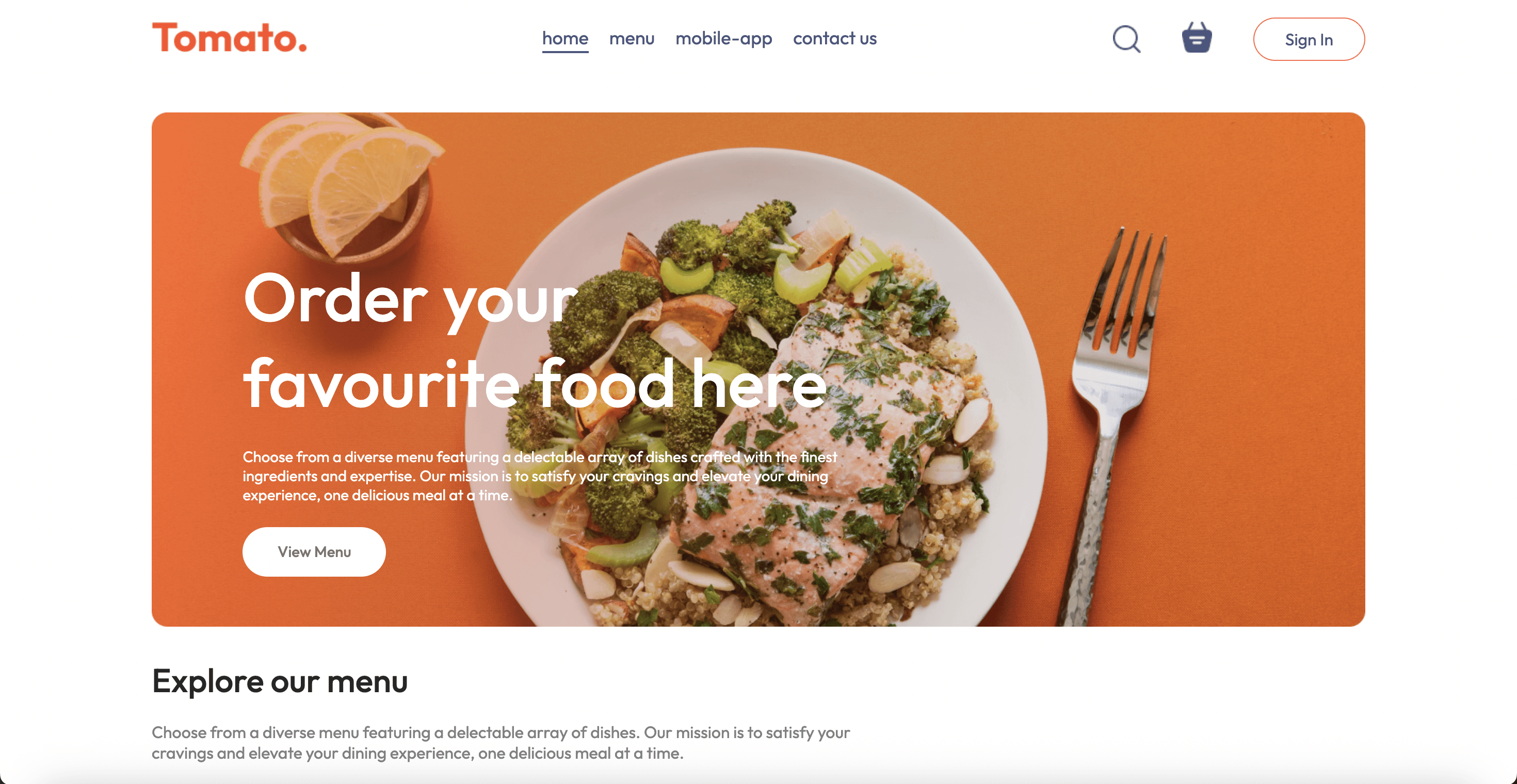
This project is a fully working food delivery web application - the kind of thing you'd build if you were starting a small restaurant's online ordering system. Customers can browse a menu organized by category, add items to a cart, log in or register, enter their delivery address, pay with a real credit card via Stripe, and receive an order confirmation.
On the backend, every order is saved to MongoDB with its full details - customer, items, total, delivery address, and payment status. The admin panel gives the restaurant operator a complete view of all incoming orders, the ability to update order status from "Processing" to "Out for Delivery" to "Delivered", and full control over the menu including adding, editing, and removing food items with image uploads.
It's built with React on the frontend, Node.js and Express on the backend, MongoDB for the database, and Stripe for payments. All three parts - customer frontend, backend API, and admin panel are deployed live.
Challenge:
Integrating Stripe in a way that's actually secure was the most technically demanding part of this project. The payment intent needs to be created on the backend, never on the frontend, because exposing the Stripe secret key in client-side code is a major security vulnerability. Getting the frontend and backend to coordinate correctly through the payment flow, handling both successful payments and failures gracefully, required understanding how Stripe's client-secret pattern works.
Managing cart state across the application - adding items, updating quantities, removing items, persisting the cart when a user logs in and logs out needed careful state management with React Context so that the cart was always in sync no matter which page the user was on.
On the admin side, building a file upload system for menu item images that worked in production (not just locally) required connecting Multer on the backend with proper storage configuration, so images are saved reliably and served back to the frontend.
features:
Customer Storefront: Browse a categorized menu and filter by food type in a single click. Cart state persists across navigation via React Context and updates instantly. Users log in before checkout, enter a delivery address, and are sent to Stripe's hosted payment page. On success, a confirmation page shows the full order summary. Order history is accessible from the profile with live status updates.
Admin Panel: A separate React app with admin-only authentication. Admins add food items with name, description, price, category, and an uploaded image in a single form submission. The orders view lists every order placed, with a status dropdown on each row to move it through Food Processing, Out for Delivery, and Delivered - which immediately reflects in the customer's view.
System-Level: Stripe secret key never touches the frontend. Orders only exist in the database after payment confirmation. JWT protects all user-specific routes. Cart clears only on confirmed payment success to prevent data loss during checkout navigation.
tech stack:
React 18: Separate customer and admin applications. Context API manages cart and auth state. Axios handles all API calls.
Node.js + Express: Routes split by concern across food, user, cart, and order controllers, each with their own middleware.
MongoDB + Mongoose: Three core collections: Users, Food Items, and Orders. Orders store a full snapshot of items, quantities, prices, delivery address, and payment status.
Stripe: Payment sessions created server-side. Customer redirected to Stripe's hosted checkout. Order written to DB only after confirmed payment.
Multer: Handles image uploads for food items in the admin panel. Images served from the backend upload directory with URL saved to the food item document.
Deployment: All three services deployed as separate web services on Render, each with independent environment variable configuration,
process:
Architecture came first. Three separate apps sharing one backend, one database. The most important schema decision early on was storing a full snapshot of each food item inside the order document not just a reference ID. That way if a menu price changes later, every historical order still reflects exactly what was charged at the time.
The backend was built around six clear concerns: user auth, food item management, cart operations, order creation, payment processing and order status updates. Splitting routes by concern from the start kept the codebase clean as it grew.
The Stripe flow required the most thought. The payment session is created entirely on the backend with the correct line items and amounts. The customer is redirected to Stripe's hosted checkout, and the order is only written to MongoDB after Stripe confirms a successful payment on the return redirect. Failed or abandoned payments leave nothing behind in the database.
The customer storefront was built around a single cart Context that any component can read from or write to. The main challenge here was keeping cart state intact across the Stripe redirect - the cart only clears on a confirmed successful payment, not on navigation or a back-button press mid-checkout.
The admin panel came last - a separate React app with its own auth, menu management with image uploads via Multer, and an orders view where status can be updated through the fulfilment stages in a single dropdown. Status changes reflect immediately in the customer's order history.
All three services are deployed independently on Render with environment variables handling every credential. Nothing sensitive is in the repository.
Testing & Feedback:
I tested the full order flow end to end using Stripe's test card numbers before going live. This surfaced one bug - if a user added items to cart, started checkout, then navigated back without completing payment, the cart would sometimes show stale data. I fixed this by clearing cart state only on confirmed payment success rather than on checkout page load.
I also tested the admin panel order status updates and confirmed they reflect in the customer's order history without requiring a page refresh - the frontend polls for status updates every 10 seconds.
results:
A fully working food ordering platform deployed across three live URLs - customer app, admin panel, and backend API. Customers can browse the full menu by category, add items to cart, register or log in, enter a delivery address, and complete a real Stripe payment. Orders are saved immediately to the database and visible in the admin panel in real time.
Administrators can log into a separate panel, add new food items with names, descriptions, prices, categories, and photos, see every order placed with its status and full details, and update order status as it progresses from placed to delivered. The payment flow handles both success and failure states - failed payments do not create orders in the database.
conclusion:
Building a food delivery platform end-to-end showed me how much work goes into what feels like a simple product when you use it. The cart logic alone - edge cases like quantity changes, item removal, cart persistence on login/logout - took longer than I expected. And the Stripe integration made me understand why payment processing is a specialized skill: there are a lot of ways to do it insecurely.
The project also reinforced the value of separating the admin and customer applications from the start rather than trying to build a single app that handles both with routing and role checks. Two clean apps are far easier to reason about than one complicated app with conditional rendering everywhere.
What I'd Do Differently:
I'd add real-time order tracking using WebSockets or Server-Sent Events rather than polling every 10 seconds. When the admin updates an order to "Out for Delivery", the customer's page should update instantly rather than waiting for the next poll interval.
I'd also add a proper email system - order confirmation emails with a receipt, and a delivery notification when the status changes to "Out for Delivery". These are things every real food delivery platform has and they'd make the project feel complete rather than close.
Full Stack - Web Development
FOOD DELIVERY SYSTEM - FULL-STACK ORDERING PLATFORM
FOOD DELIVERY SYSTEM - FULL-STACK ORDERING PLATFORM
A complete food ordering and delivery platform with a customer storefront, real-time order management, Stripe payment integration, and a separate admin panel for managing the menu and tracking all orders.
Year :
Year :
2024
2024
Industry :
Industry :
Food & Delivery
Food & Delivery
Type :
Type :
Personal Project
Personal Project
Project Duration :
Project Duration :
6 weeks
6 weeks
Introduction:
This project is a fully working food delivery web application - the kind of thing you'd build if you were starting a small restaurant's online ordering system. Customers can browse a menu organized by category, add items to a cart, log in or register, enter their delivery address, pay with a real credit card via Stripe, and receive an order confirmation.
On the backend, every order is saved to MongoDB with its full details - customer, items, total, delivery address, and payment status. The admin panel gives the restaurant operator a complete view of all incoming orders, the ability to update order status from "Processing" to "Out for Delivery" to "Delivered", and full control over the menu including adding, editing, and removing food items with image uploads.
It's built with React on the frontend, Node.js and Express on the backend, MongoDB for the database, and Stripe for payments. All three parts - customer frontend, backend API, and admin panel are deployed live.
Challenge:
Integrating Stripe in a way that's actually secure was the most technically demanding part of this project. The payment intent needs to be created on the backend, never on the frontend, because exposing the Stripe secret key in client-side code is a major security vulnerability. Getting the frontend and backend to coordinate correctly through the payment flow, handling both successful payments and failures gracefully, required understanding how Stripe's client-secret pattern works.
Managing cart state across the application - adding items, updating quantities, removing items, persisting the cart when a user logs in and logs out needed careful state management with React Context so that the cart was always in sync no matter which page the user was on.
On the admin side, building a file upload system for menu item images that worked in production (not just locally) required connecting Multer on the backend with proper storage configuration, so images are saved reliably and served back to the frontend.
features:
Customer Storefront: Browse a categorized menu and filter by food type in a single click. Cart state persists across navigation via React Context and updates instantly. Users log in before checkout, enter a delivery address, and are sent to Stripe's hosted payment page. On success, a confirmation page shows the full order summary. Order history is accessible from the profile with live status updates.
Admin Panel: A separate React app with admin-only authentication. Admins add food items with name, description, price, category, and an uploaded image in a single form submission. The orders view lists every order placed, with a status dropdown on each row to move it through Food Processing, Out for Delivery, and Delivered - which immediately reflects in the customer's view.
System-Level: Stripe secret key never touches the frontend. Orders only exist in the database after payment confirmation. JWT protects all user-specific routes. Cart clears only on confirmed payment success to prevent data loss during checkout navigation.
tech stack:
React 18: Separate customer and admin applications. Context API manages cart and auth state. Axios handles all API calls.
Node.js + Express: Routes split by concern across food, user, cart, and order controllers, each with their own middleware.
MongoDB + Mongoose: Three core collections: Users, Food Items, and Orders. Orders store a full snapshot of items, quantities, prices, delivery address, and payment status.
Stripe: Payment sessions created server-side. Customer redirected to Stripe's hosted checkout. Order written to DB only after confirmed payment.
Multer: Handles image uploads for food items in the admin panel. Images served from the backend upload directory with URL saved to the food item document.
Deployment: All three services deployed as separate web services on Render, each with independent environment variable configuration,
process:
Architecture came first. Three separate apps sharing one backend, one database. The most important schema decision early on was storing a full snapshot of each food item inside the order document not just a reference ID. That way if a menu price changes later, every historical order still reflects exactly what was charged at the time.
The backend was built around six clear concerns: user auth, food item management, cart operations, order creation, payment processing and order status updates. Splitting routes by concern from the start kept the codebase clean as it grew.
The Stripe flow required the most thought. The payment session is created entirely on the backend with the correct line items and amounts. The customer is redirected to Stripe's hosted checkout, and the order is only written to MongoDB after Stripe confirms a successful payment on the return redirect. Failed or abandoned payments leave nothing behind in the database.
The customer storefront was built around a single cart Context that any component can read from or write to. The main challenge here was keeping cart state intact across the Stripe redirect - the cart only clears on a confirmed successful payment, not on navigation or a back-button press mid-checkout.
The admin panel came last - a separate React app with its own auth, menu management with image uploads via Multer, and an orders view where status can be updated through the fulfilment stages in a single dropdown. Status changes reflect immediately in the customer's order history.
All three services are deployed independently on Render with environment variables handling every credential. Nothing sensitive is in the repository.
Testing & Feedback:
I tested the full order flow end to end using Stripe's test card numbers before going live. This surfaced one bug - if a user added items to cart, started checkout, then navigated back without completing payment, the cart would sometimes show stale data. I fixed this by clearing cart state only on confirmed payment success rather than on checkout page load.
I also tested the admin panel order status updates and confirmed they reflect in the customer's order history without requiring a page refresh - the frontend polls for status updates every 10 seconds.
results:
A fully working food ordering platform deployed across three live URLs - customer app, admin panel, and backend API. Customers can browse the full menu by category, add items to cart, register or log in, enter a delivery address, and complete a real Stripe payment. Orders are saved immediately to the database and visible in the admin panel in real time.
Administrators can log into a separate panel, add new food items with names, descriptions, prices, categories, and photos, see every order placed with its status and full details, and update order status as it progresses from placed to delivered. The payment flow handles both success and failure states - failed payments do not create orders in the database.
conclusion:
Building a food delivery platform end-to-end showed me how much work goes into what feels like a simple product when you use it. The cart logic alone - edge cases like quantity changes, item removal, cart persistence on login/logout - took longer than I expected. And the Stripe integration made me understand why payment processing is a specialized skill: there are a lot of ways to do it insecurely.
The project also reinforced the value of separating the admin and customer applications from the start rather than trying to build a single app that handles both with routing and role checks. Two clean apps are far easier to reason about than one complicated app with conditional rendering everywhere.
What I'd Do Differently:
I'd add real-time order tracking using WebSockets or Server-Sent Events rather than polling every 10 seconds. When the admin updates an order to "Out for Delivery", the customer's page should update instantly rather than waiting for the next poll interval.
I'd also add a proper email system - order confirmation emails with a receipt, and a delivery notification when the status changes to "Out for Delivery". These are things every real food delivery platform has and they'd make the project feel complete rather than close.
Full Stack - Web Development
FOOD DELIVERY SYSTEM - FULL-STACK ORDERING PLATFORM
FOOD DELIVERY SYSTEM - FULL-STACK ORDERING PLATFORM
A complete food ordering and delivery platform with a customer storefront, real-time order management, Stripe payment integration, and a separate admin panel for managing the menu and tracking all orders.
Year :
Year :
2024
2024
Industry :
Industry :
Food & Delivery
Food & Delivery
Type :
Type :
Personal Project
Personal Project
Project Duration :
Project Duration :
6 weeks
6 weeks
Introduction:
This project is a fully working food delivery web application - the kind of thing you'd build if you were starting a small restaurant's online ordering system. Customers can browse a menu organized by category, add items to a cart, log in or register, enter their delivery address, pay with a real credit card via Stripe, and receive an order confirmation.
On the backend, every order is saved to MongoDB with its full details - customer, items, total, delivery address, and payment status. The admin panel gives the restaurant operator a complete view of all incoming orders, the ability to update order status from "Processing" to "Out for Delivery" to "Delivered", and full control over the menu including adding, editing, and removing food items with image uploads.
It's built with React on the frontend, Node.js and Express on the backend, MongoDB for the database, and Stripe for payments. All three parts - customer frontend, backend API, and admin panel are deployed live.
Challenge:
Integrating Stripe in a way that's actually secure was the most technically demanding part of this project. The payment intent needs to be created on the backend, never on the frontend, because exposing the Stripe secret key in client-side code is a major security vulnerability. Getting the frontend and backend to coordinate correctly through the payment flow, handling both successful payments and failures gracefully, required understanding how Stripe's client-secret pattern works.
Managing cart state across the application - adding items, updating quantities, removing items, persisting the cart when a user logs in and logs out needed careful state management with React Context so that the cart was always in sync no matter which page the user was on.
On the admin side, building a file upload system for menu item images that worked in production (not just locally) required connecting Multer on the backend with proper storage configuration, so images are saved reliably and served back to the frontend.
features:
Customer Storefront: Browse a categorized menu and filter by food type in a single click. Cart state persists across navigation via React Context and updates instantly. Users log in before checkout, enter a delivery address, and are sent to Stripe's hosted payment page. On success, a confirmation page shows the full order summary. Order history is accessible from the profile with live status updates.
Admin Panel: A separate React app with admin-only authentication. Admins add food items with name, description, price, category, and an uploaded image in a single form submission. The orders view lists every order placed, with a status dropdown on each row to move it through Food Processing, Out for Delivery, and Delivered - which immediately reflects in the customer's view.
System-Level: Stripe secret key never touches the frontend. Orders only exist in the database after payment confirmation. JWT protects all user-specific routes. Cart clears only on confirmed payment success to prevent data loss during checkout navigation.
tech stack:
React 18: Separate customer and admin applications. Context API manages cart and auth state. Axios handles all API calls.
Node.js + Express: Routes split by concern across food, user, cart, and order controllers, each with their own middleware.
MongoDB + Mongoose: Three core collections: Users, Food Items, and Orders. Orders store a full snapshot of items, quantities, prices, delivery address, and payment status.
Stripe: Payment sessions created server-side. Customer redirected to Stripe's hosted checkout. Order written to DB only after confirmed payment.
Multer: Handles image uploads for food items in the admin panel. Images served from the backend upload directory with URL saved to the food item document.
Deployment: All three services deployed as separate web services on Render, each with independent environment variable configuration,
process:
Architecture came first. Three separate apps sharing one backend, one database. The most important schema decision early on was storing a full snapshot of each food item inside the order document not just a reference ID. That way if a menu price changes later, every historical order still reflects exactly what was charged at the time.
The backend was built around six clear concerns: user auth, food item management, cart operations, order creation, payment processing and order status updates. Splitting routes by concern from the start kept the codebase clean as it grew.
The Stripe flow required the most thought. The payment session is created entirely on the backend with the correct line items and amounts. The customer is redirected to Stripe's hosted checkout, and the order is only written to MongoDB after Stripe confirms a successful payment on the return redirect. Failed or abandoned payments leave nothing behind in the database.
The customer storefront was built around a single cart Context that any component can read from or write to. The main challenge here was keeping cart state intact across the Stripe redirect - the cart only clears on a confirmed successful payment, not on navigation or a back-button press mid-checkout.
The admin panel came last - a separate React app with its own auth, menu management with image uploads via Multer, and an orders view where status can be updated through the fulfilment stages in a single dropdown. Status changes reflect immediately in the customer's order history.
All three services are deployed independently on Render with environment variables handling every credential. Nothing sensitive is in the repository.
Testing & Feedback:
I tested the full order flow end to end using Stripe's test card numbers before going live. This surfaced one bug - if a user added items to cart, started checkout, then navigated back without completing payment, the cart would sometimes show stale data. I fixed this by clearing cart state only on confirmed payment success rather than on checkout page load.
I also tested the admin panel order status updates and confirmed they reflect in the customer's order history without requiring a page refresh - the frontend polls for status updates every 10 seconds.
results:
A fully working food ordering platform deployed across three live URLs - customer app, admin panel, and backend API. Customers can browse the full menu by category, add items to cart, register or log in, enter a delivery address, and complete a real Stripe payment. Orders are saved immediately to the database and visible in the admin panel in real time.
Administrators can log into a separate panel, add new food items with names, descriptions, prices, categories, and photos, see every order placed with its status and full details, and update order status as it progresses from placed to delivered. The payment flow handles both success and failure states - failed payments do not create orders in the database.
conclusion:
Building a food delivery platform end-to-end showed me how much work goes into what feels like a simple product when you use it. The cart logic alone - edge cases like quantity changes, item removal, cart persistence on login/logout - took longer than I expected. And the Stripe integration made me understand why payment processing is a specialized skill: there are a lot of ways to do it insecurely.
The project also reinforced the value of separating the admin and customer applications from the start rather than trying to build a single app that handles both with routing and role checks. Two clean apps are far easier to reason about than one complicated app with conditional rendering everywhere.
What I'd Do Differently:
I'd add real-time order tracking using WebSockets or Server-Sent Events rather than polling every 10 seconds. When the admin updates an order to "Out for Delivery", the customer's page should update instantly rather than waiting for the next poll interval.
I'd also add a proper email system - order confirmation emails with a receipt, and a delivery notification when the status changes to "Out for Delivery". These are things every real food delivery platform has and they'd make the project feel complete rather than close.