Saas Web Application
DevTrack - Project Management Dashboard
DevTrack - Project Management Dashboard
A full-stack Python web app for managing projects and tasks, built with Flask, SQLAlchemy and a real database - featuring a Kanban board, live analytics charts and complete user authentication.
Year :
Year :
2025
2025
Industry :
Industry :
Productivity/SaaS
Productivity/SaaS
Client :
Client :
Personal Project
Personal Project
Project Duration :
Project Duration :
2 weeks
2 weeks
Introduction:
DevTrack is a full-stack project management dashboard I built from the ground up using Python and Flask. The idea came from wanting to demonstrate backend engineering skills in a way that felt real and useful - not just a tutorial clone, but something that actually solves a problem.
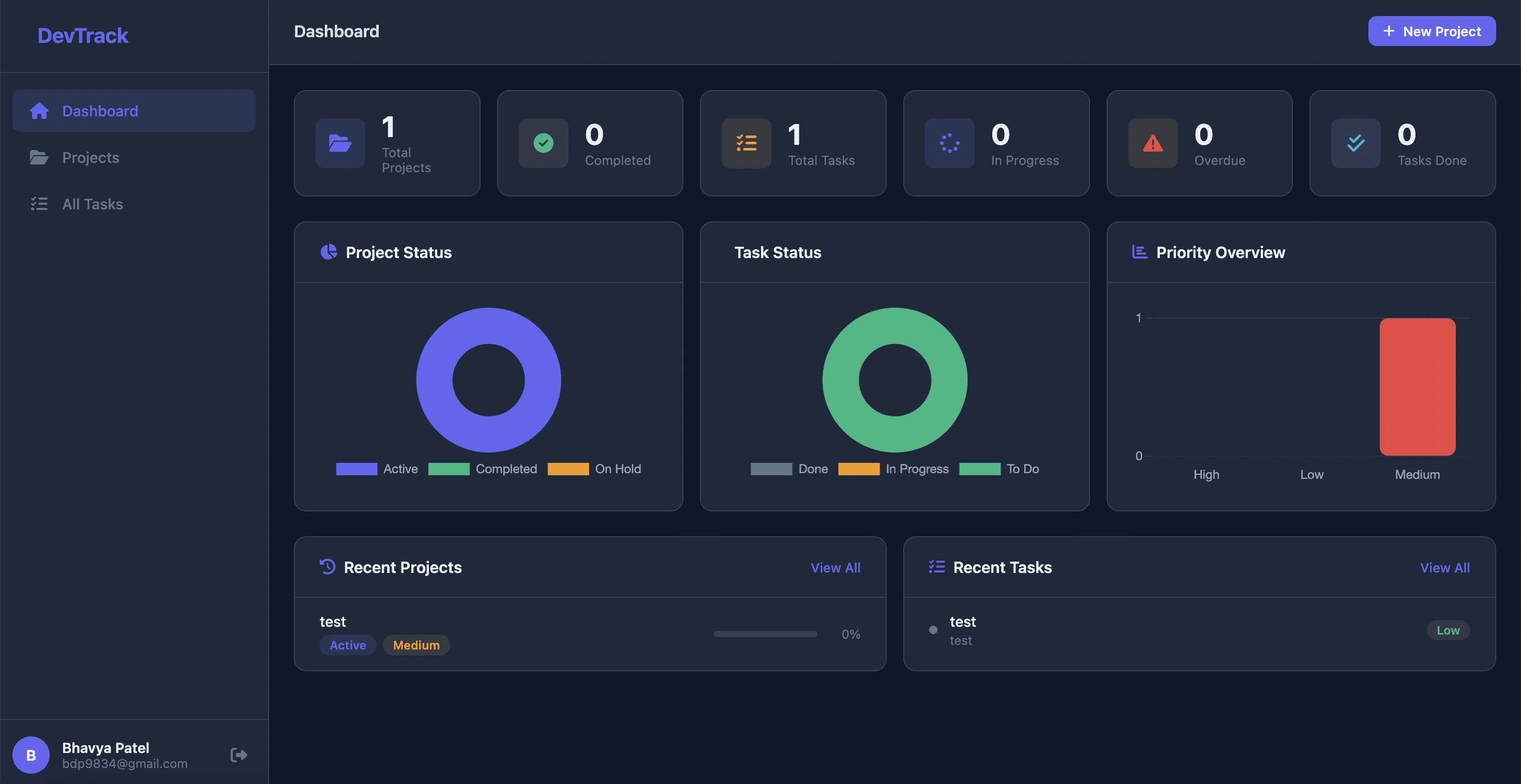
The app supports full user authentication, persistent data storage with SQLite, and a clean dark dashboard where you can create projects, manage tasks across a Kanban board, track deadlines, and visualize your workload through live charts. Everything updates in real time and every feature works end to end.
Challenge:
The main challenge was architecting a clean backend that could power multiple interconnected features without becoming difficult to maintain. Projects have tasks, tasks belong to projects, and both are scoped to individual users - so the relational data model had to be designed carefully from the start to avoid messy queries later.
A secondary challenge was making the dashboard feel genuinely useful rather than just functional. The stats, charts, and Kanban board all had to update based on real data - so the progress percentages, overdue flags and chart breakdowns are all derived dynamically from the database on every request, not hardcoded.
features:
Dashboard: Six live stat cards covering total projects, completed projects, active tasks, in-progress tasks, overdue projects, and tasks done.Three Chart.js visualizations - project status doughnut, task status doughnut and a priority bar chart - all fed from a dedicated JSON API endpoint.Projects: Full create, edit and delete with status tracking (Active, Completed, On Hold), priority levels (Low, Medium, High), deadline setting and an auto-calculated progress bar based on completed tasks. Filter projects by status and priority.Kanban Board: Each project has a three-column Kanban view - To Do, In Progress, and Done. Tasks can be moved between columns instantly via AJAX without a page reload. Task count per column updates dynamically.All Tasks: A global task table across all projects with status and priority filters, inline edit and delete and clickable project links.Authentication: Full register and login system with hashed passwords, session management and protected routes. Every user sees only their own data.Overdue Detection: Projects automatically flag as overdue if their deadline has passed and they are not yet completed. Overdue projects get a visual indicator on the card and a badge on the detail page.
tech stack:
Python / Flask: Core backend framework. Routes, authentication, form handling and API endpoints all built with Flask. Chose Flask over Django for its simplicity and because it keeps the architecture transparent.SQLAlchemy: ORM for all database operations. Models for User, Project, and Task with proper relationships and cascade deletes. SQLite locally, PostgreSQL in production on Render for persistent cloud storage.PostgreSQL: Production database hosted on Render. Handles all user data, projects, and tasks persistently across server restarts. Connected via psycopg3 driver.Flask-Login: Session management and route protection. Handles the login/logout lifecycle and ensures unauthenticated users cannot access any dashboard routes.Jinja2: Server-side templating. All HTML is rendered server-side with dynamic data injected per request.Chart.js: Three interactive charts on the dashboard, populated via a /api/chart-data JSON endpoint Flask serves on demand.Werkzeug: Password hashing for secure credential storage. No plaintext passwords anywhere in the database.Custom CSS: Full dark design system built with CSS variables. No framework - every component, card, modal and layout is hand-written.
process:
I started with the data model before writing a single route. Designing the User -> Project -> Task relationships first meant every feature I built on top of it had a clean, predictable foundation.
I built authentication first since every other feature depended on knowing who the current user was. Once login and registration were solid, I moved to projects, then tasks, then the dashboard analytics.
The design direction was a dark editorial theme - the same reasoning as most developer tools. Numbers, charts and status badges read better on dark backgrounds and the interface feels more focused for extended use.
The chart data is served from a dedicated API route rather than injected directly into the template, which means the dashboard could eventually be decoupled into a proper frontend without touching the backend logic.
results:
Fully working app deployed on Render with a live URL. Every feature works end to end - create a project, add tasks, move them through the Kanban board, and watch the dashboard charts and progress bars update in real time.
The authentication system is production-grade with hashed passwords and protected routes. The relational database handles multi-user data isolation correctly - each user sees only their own projects and tasks.
The codebase is organized the way a real backend project would be - models, routes, and templates clearly separated - demonstrating not just that I can write Python, but that I can structure a backend properly.
conclusion:
This project taught me how much a well-designed data model simplifies everything that comes after it. Because the relationships between users, projects and tasks were clean from the start, every feature - progress tracking, overdue detection, chart breakdowns, Kanban columns - was just a matter of querying that model correctly.
Flask turned out to be an ideal choice for this scope. It enforces nothing, so every architectural decision is deliberate and visible in the code. That makes it a better portfolio piece than a heavier framework that hides what's actually happening.
What I'd Do Differently:
I'd replace SQLite with PostgreSQL from the start. SQLite is fine for a portfolio project but it resets on free hosting platforms when the server restarts. PostgreSQL would give the app real persistence without changing any of the application code - just the connection string.
I'd also add a proper REST API layer and rebuild the frontend in React. The backend is already 90% there - the chart endpoint proves the data can be served as JSON. Decoupling the frontend would turn DevTrack into a genuinely scalable full-stack application.
Saas Web Application
DevTrack - Project Management Dashboard
DevTrack - Project Management Dashboard
A full-stack Python web app for managing projects and tasks, built with Flask, SQLAlchemy and a real database - featuring a Kanban board, live analytics charts and complete user authentication.
Year :
Year :
2025
2025
Industry :
Industry :
Productivity/SaaS
Productivity/SaaS
Client :
Client :
Personal Project
Personal Project
Project Duration :
Project Duration :
2 weeks
2 weeks
Introduction:
DevTrack is a full-stack project management dashboard I built from the ground up using Python and Flask. The idea came from wanting to demonstrate backend engineering skills in a way that felt real and useful - not just a tutorial clone, but something that actually solves a problem.
The app supports full user authentication, persistent data storage with SQLite, and a clean dark dashboard where you can create projects, manage tasks across a Kanban board, track deadlines, and visualize your workload through live charts. Everything updates in real time and every feature works end to end.
Challenge:
The main challenge was architecting a clean backend that could power multiple interconnected features without becoming difficult to maintain. Projects have tasks, tasks belong to projects, and both are scoped to individual users - so the relational data model had to be designed carefully from the start to avoid messy queries later.
A secondary challenge was making the dashboard feel genuinely useful rather than just functional. The stats, charts, and Kanban board all had to update based on real data - so the progress percentages, overdue flags and chart breakdowns are all derived dynamically from the database on every request, not hardcoded.
features:
Dashboard: Six live stat cards covering total projects, completed projects, active tasks, in-progress tasks, overdue projects, and tasks done.Three Chart.js visualizations - project status doughnut, task status doughnut and a priority bar chart - all fed from a dedicated JSON API endpoint.Projects: Full create, edit and delete with status tracking (Active, Completed, On Hold), priority levels (Low, Medium, High), deadline setting and an auto-calculated progress bar based on completed tasks. Filter projects by status and priority.Kanban Board: Each project has a three-column Kanban view - To Do, In Progress, and Done. Tasks can be moved between columns instantly via AJAX without a page reload. Task count per column updates dynamically.All Tasks: A global task table across all projects with status and priority filters, inline edit and delete and clickable project links.Authentication: Full register and login system with hashed passwords, session management and protected routes. Every user sees only their own data.Overdue Detection: Projects automatically flag as overdue if their deadline has passed and they are not yet completed. Overdue projects get a visual indicator on the card and a badge on the detail page.
tech stack:
Python / Flask: Core backend framework. Routes, authentication, form handling and API endpoints all built with Flask. Chose Flask over Django for its simplicity and because it keeps the architecture transparent.SQLAlchemy: ORM for all database operations. Models for User, Project, and Task with proper relationships and cascade deletes. SQLite locally, PostgreSQL in production on Render for persistent cloud storage.PostgreSQL: Production database hosted on Render. Handles all user data, projects, and tasks persistently across server restarts. Connected via psycopg3 driver.Flask-Login: Session management and route protection. Handles the login/logout lifecycle and ensures unauthenticated users cannot access any dashboard routes.Jinja2: Server-side templating. All HTML is rendered server-side with dynamic data injected per request.Chart.js: Three interactive charts on the dashboard, populated via a /api/chart-data JSON endpoint Flask serves on demand.Werkzeug: Password hashing for secure credential storage. No plaintext passwords anywhere in the database.Custom CSS: Full dark design system built with CSS variables. No framework - every component, card, modal and layout is hand-written.
process:
I started with the data model before writing a single route. Designing the User -> Project -> Task relationships first meant every feature I built on top of it had a clean, predictable foundation.
I built authentication first since every other feature depended on knowing who the current user was. Once login and registration were solid, I moved to projects, then tasks, then the dashboard analytics.
The design direction was a dark editorial theme - the same reasoning as most developer tools. Numbers, charts and status badges read better on dark backgrounds and the interface feels more focused for extended use.
The chart data is served from a dedicated API route rather than injected directly into the template, which means the dashboard could eventually be decoupled into a proper frontend without touching the backend logic.
results:
Fully working app deployed on Render with a live URL. Every feature works end to end - create a project, add tasks, move them through the Kanban board, and watch the dashboard charts and progress bars update in real time.
The authentication system is production-grade with hashed passwords and protected routes. The relational database handles multi-user data isolation correctly - each user sees only their own projects and tasks.
The codebase is organized the way a real backend project would be - models, routes, and templates clearly separated - demonstrating not just that I can write Python, but that I can structure a backend properly.
conclusion:
This project taught me how much a well-designed data model simplifies everything that comes after it. Because the relationships between users, projects and tasks were clean from the start, every feature - progress tracking, overdue detection, chart breakdowns, Kanban columns - was just a matter of querying that model correctly.
Flask turned out to be an ideal choice for this scope. It enforces nothing, so every architectural decision is deliberate and visible in the code. That makes it a better portfolio piece than a heavier framework that hides what's actually happening.
What I'd Do Differently:
I'd replace SQLite with PostgreSQL from the start. SQLite is fine for a portfolio project but it resets on free hosting platforms when the server restarts. PostgreSQL would give the app real persistence without changing any of the application code - just the connection string.
I'd also add a proper REST API layer and rebuild the frontend in React. The backend is already 90% there - the chart endpoint proves the data can be served as JSON. Decoupling the frontend would turn DevTrack into a genuinely scalable full-stack application.
Saas Web Application
DevTrack - Project Management Dashboard
DevTrack - Project Management Dashboard
A full-stack Python web app for managing projects and tasks, built with Flask, SQLAlchemy and a real database - featuring a Kanban board, live analytics charts and complete user authentication.
Year :
Year :
2025
2025
Industry :
Industry :
Productivity/SaaS
Productivity/SaaS
Client :
Client :
Personal Project
Personal Project
Project Duration :
Project Duration :
2 weeks
2 weeks
Introduction:
DevTrack is a full-stack project management dashboard I built from the ground up using Python and Flask. The idea came from wanting to demonstrate backend engineering skills in a way that felt real and useful - not just a tutorial clone, but something that actually solves a problem.
The app supports full user authentication, persistent data storage with SQLite, and a clean dark dashboard where you can create projects, manage tasks across a Kanban board, track deadlines, and visualize your workload through live charts. Everything updates in real time and every feature works end to end.
Challenge:
The main challenge was architecting a clean backend that could power multiple interconnected features without becoming difficult to maintain. Projects have tasks, tasks belong to projects, and both are scoped to individual users - so the relational data model had to be designed carefully from the start to avoid messy queries later.
A secondary challenge was making the dashboard feel genuinely useful rather than just functional. The stats, charts, and Kanban board all had to update based on real data - so the progress percentages, overdue flags and chart breakdowns are all derived dynamically from the database on every request, not hardcoded.
features:
Dashboard: Six live stat cards covering total projects, completed projects, active tasks, in-progress tasks, overdue projects, and tasks done.Three Chart.js visualizations - project status doughnut, task status doughnut and a priority bar chart - all fed from a dedicated JSON API endpoint.Projects: Full create, edit and delete with status tracking (Active, Completed, On Hold), priority levels (Low, Medium, High), deadline setting and an auto-calculated progress bar based on completed tasks. Filter projects by status and priority.Kanban Board: Each project has a three-column Kanban view - To Do, In Progress, and Done. Tasks can be moved between columns instantly via AJAX without a page reload. Task count per column updates dynamically.All Tasks: A global task table across all projects with status and priority filters, inline edit and delete and clickable project links.Authentication: Full register and login system with hashed passwords, session management and protected routes. Every user sees only their own data.Overdue Detection: Projects automatically flag as overdue if their deadline has passed and they are not yet completed. Overdue projects get a visual indicator on the card and a badge on the detail page.
tech stack:
Python / Flask: Core backend framework. Routes, authentication, form handling and API endpoints all built with Flask. Chose Flask over Django for its simplicity and because it keeps the architecture transparent.SQLAlchemy: ORM for all database operations. Models for User, Project, and Task with proper relationships and cascade deletes. SQLite locally, PostgreSQL in production on Render for persistent cloud storage.PostgreSQL: Production database hosted on Render. Handles all user data, projects, and tasks persistently across server restarts. Connected via psycopg3 driver.Flask-Login: Session management and route protection. Handles the login/logout lifecycle and ensures unauthenticated users cannot access any dashboard routes.Jinja2: Server-side templating. All HTML is rendered server-side with dynamic data injected per request.Chart.js: Three interactive charts on the dashboard, populated via a /api/chart-data JSON endpoint Flask serves on demand.Werkzeug: Password hashing for secure credential storage. No plaintext passwords anywhere in the database.Custom CSS: Full dark design system built with CSS variables. No framework - every component, card, modal and layout is hand-written.
process:
I started with the data model before writing a single route. Designing the User -> Project -> Task relationships first meant every feature I built on top of it had a clean, predictable foundation.
I built authentication first since every other feature depended on knowing who the current user was. Once login and registration were solid, I moved to projects, then tasks, then the dashboard analytics.
The design direction was a dark editorial theme - the same reasoning as most developer tools. Numbers, charts and status badges read better on dark backgrounds and the interface feels more focused for extended use.
The chart data is served from a dedicated API route rather than injected directly into the template, which means the dashboard could eventually be decoupled into a proper frontend without touching the backend logic.
results:
Fully working app deployed on Render with a live URL. Every feature works end to end - create a project, add tasks, move them through the Kanban board, and watch the dashboard charts and progress bars update in real time.
The authentication system is production-grade with hashed passwords and protected routes. The relational database handles multi-user data isolation correctly - each user sees only their own projects and tasks.
The codebase is organized the way a real backend project would be - models, routes, and templates clearly separated - demonstrating not just that I can write Python, but that I can structure a backend properly.
conclusion:
This project taught me how much a well-designed data model simplifies everything that comes after it. Because the relationships between users, projects and tasks were clean from the start, every feature - progress tracking, overdue detection, chart breakdowns, Kanban columns - was just a matter of querying that model correctly.
Flask turned out to be an ideal choice for this scope. It enforces nothing, so every architectural decision is deliberate and visible in the code. That makes it a better portfolio piece than a heavier framework that hides what's actually happening.
What I'd Do Differently:
I'd replace SQLite with PostgreSQL from the start. SQLite is fine for a portfolio project but it resets on free hosting platforms when the server restarts. PostgreSQL would give the app real persistence without changing any of the application code - just the connection string.
I'd also add a proper REST API layer and rebuild the frontend in React. The backend is already 90% there - the chart endpoint proves the data can be served as JSON. Decoupling the frontend would turn DevTrack into a genuinely scalable full-stack application.