Full Stack - Web Development
BANKBUDDY - BANK APPOINTMENT SYSTEM
BANKBUDDY - BANK APPOINTMENT SYSTEM
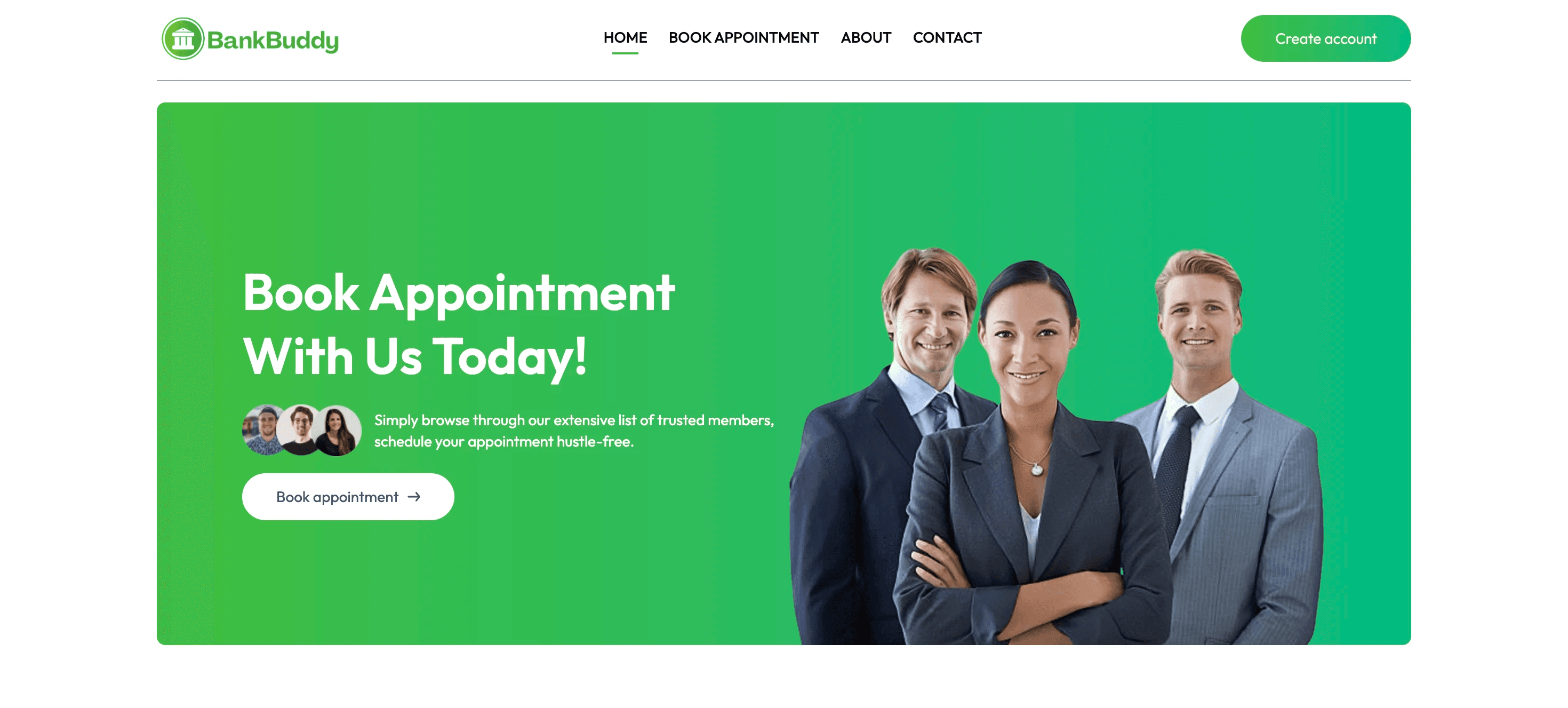
A full-stack web application that digitizes the bank appointment process - letting customers book, reschedule, and manage appointments while giving administrators complete control over staff availability and scheduling.
Year :
Year :
2024
2024
Industry :
Industry :
Banking / Fintech
Banking / Fintech
Type :
Type :
Capstone Project
Capstone Project
Project Duration :
Project Duration :
7 weeks
7 weeks
Admin panel username: admin@bankbuddy.com
Admin panel password: admin@123
Introduction:
BankBuddy was built as my capstone project with a real problem at its core - bank branches still rely heavily on walk-ins, leading to long wait times and poor customer experience. This application digitizes the entire appointment process end to end.
The system has three fully working parts: a customer-facing frontend where users can register, book appointments, and manage their profiles; a Node.js/Express backend that handles all authentication, business logic, and database operations and a separate admin panel where bank staff can manage employees, view all appointments, and control scheduling availability.
Everything is production-ready - JWT authentication protects every route, profile images are stored on Cloudinary, and all data persists in MongoDB Atlas.
Challenge:
Building three separate applications that all talk to the same backend cleanly was the main architectural challenge. The admin panel needed completely separate authentication logic from the customer side - an admin token cannot be used on the customer app and vice versa. Getting this role-based access control right took careful planning on the backend before writing a single line of frontend code.
A second challenge was managing appointment conflicts - if a staff member is booked for a slot, that slot needs to be unavailable in real time for all other customers browsing at the same moment. Handling this at the database level with proper validation rather than just on the frontend was something I had to think carefully about.
Finally, deploying three interconnected apps (frontend, backend, admin) and making them talk to each other correctly in production - with the right environment variables and CORS configuration - was a new experience that taught me a lot about how real deployments actually work.
features:
Customer Side: Browse bank staff by specialization and availability, book a specific date and time slot, reschedule or cancel from a personal dashboard, and manage profile details including a Cloudinary-hosted profile photo.
Admin Panel: A completely separate React app with its own auth flow. Admins add and manage employees, view all appointments across every customer filtered by status, date, or employee, and manually update booking status without touching the customer application.
System-Level: Server-side conflict prevention rejects duplicate slot bookings at the API layer. Role-based middleware ensures customer tokens cannot reach admin routes and vice versa. All credentials are injected via environment variables - nothing sensitive lives in the repository.
tech stack:
React 18: Component-based UI with React Router and Context API for booking state.
Node.js + Express: REST API handling auth, scheduling logic, and role-based route protection.
MongoDB + Mongoose: Collections for Users, Employees, and Appointments. Appointment schema tracks full status history across reschedules and cancellations.
JWT: Separate token systems for customers and admins. Middleware validates every protected request before it reaches the controller.
Cloudinary + Multer: Profile images uploaded via Multer, stored in Cloudinary, URL persisted to the user document in the same request.
Deployment: Render
process:
I mapped out the three-tier architecture before writing a single line of code. Customer app, admin panel, and shared backend. The MongoDB schemas for Users, Employees, and Appointments came first - every route and component depended on getting that foundation right.
The key early decision was keeping customer and admin authentication completely separate rather than building a shared role-based system. Different JWT secrets, different middleware, different routes. It made each app simpler to reason about and easier to secure.
I built the entire backend before touching any frontend. Every endpoint - register, login, create appointment, get available slots, reschedule, cancel - was tested in Postman and working before the UI existed. This meant frontend development moved fast because the API contract was already solid.
The Cloudinary integration required coordinating two operations in one request: upload the image, get the URL back, then write it to the user's MongoDB document. If either step failed the whole thing had to fail cleanly, so error handling here was more careful than a typical route.
The customer frontend followed next - staff browsing, slot selection, booking dashboard, and profile management. Then the admin panel as a completely separate React app with its own login and routing, connected to the same backend but locked to admin-only endpoints.
Deployment was the final step. Backend on Railway, both frontends on Vercel. All credentials in environment variables - nothing sensitive in the repository.
Testing & Feedback:
Peer testing revealed two issues I fixed before final submission. First, the date picker on the booking form allowed users to select past dates - I added server-side validation to reject appointments in the past and disabled past dates in the frontend picker. Second, if a user's session expired while they were mid-booking, the error was a generic network error with no user-friendly message - I added token expiry detection to redirect to the login page automatically.
results:
Three fully deployed applications running in production - customer frontend, admin panel, and backend API.
Customers can register, log in, browse available staff, book appointments for specific time slots, reschedule or cancel existing appointments, and update their profile including uploading a profile photo.
Administrators can log into a separate panel, add and manage bank employees, view all upcoming appointments across the system, and control staff availability schedules.
JWT authentication works across all three apps with role-based access - customers and admins use completely separate token systems.
conclusion:
BankBuddy taught me how a real full-stack system is structured - not just writing React components, but designing APIs, managing authentication across multiple apps, handling file uploads, and deploying everything to production. The experience of making three separate apps work together in production was more challenging than I expected, and more valuable than any tutorial.
The most important lesson was building the backend first. Every time I've seen peers struggle with full-stack projects it's because they built the UI before the API and had to constantly go back and reshape things. Planning the data model and testing the API before touching the frontend made the whole project cleaner.
What I'd Do Differently:
I'd add email notifications - an automated confirmation email when a booking is made and a reminder 24 hours before the appointment. This is something real banking apps all have and would make the project feel genuinely production-ready rather than just technically complete.
I'd also add a staff-facing view - right now employees don't have their own login. They'd need to log into the admin panel to see their schedule, which isn't realistic. A separate staff interface with a read-only view of their own appointments would make the system complete.
Full Stack - Web Development
BANKBUDDY - BANK APPOINTMENT SYSTEM
BANKBUDDY - BANK APPOINTMENT SYSTEM
A full-stack web application that digitizes the bank appointment process - letting customers book, reschedule, and manage appointments while giving administrators complete control over staff availability and scheduling.
Year :
Year :
2024
2024
Industry :
Industry :
Banking / Fintech
Banking / Fintech
Type :
Type :
Capstone Project
Capstone Project
Project Duration :
Project Duration :
7 weeks
7 weeks
Admin panel username: admin@bankbuddy.com
Admin panel password: admin@123
Introduction:
BankBuddy was built as my capstone project with a real problem at its core - bank branches still rely heavily on walk-ins, leading to long wait times and poor customer experience. This application digitizes the entire appointment process end to end.
The system has three fully working parts: a customer-facing frontend where users can register, book appointments, and manage their profiles; a Node.js/Express backend that handles all authentication, business logic, and database operations and a separate admin panel where bank staff can manage employees, view all appointments, and control scheduling availability.
Everything is production-ready - JWT authentication protects every route, profile images are stored on Cloudinary, and all data persists in MongoDB Atlas.
Challenge:
Building three separate applications that all talk to the same backend cleanly was the main architectural challenge. The admin panel needed completely separate authentication logic from the customer side - an admin token cannot be used on the customer app and vice versa. Getting this role-based access control right took careful planning on the backend before writing a single line of frontend code.
A second challenge was managing appointment conflicts - if a staff member is booked for a slot, that slot needs to be unavailable in real time for all other customers browsing at the same moment. Handling this at the database level with proper validation rather than just on the frontend was something I had to think carefully about.
Finally, deploying three interconnected apps (frontend, backend, admin) and making them talk to each other correctly in production - with the right environment variables and CORS configuration - was a new experience that taught me a lot about how real deployments actually work.
features:
Customer Side: Browse bank staff by specialization and availability, book a specific date and time slot, reschedule or cancel from a personal dashboard, and manage profile details including a Cloudinary-hosted profile photo.
Admin Panel: A completely separate React app with its own auth flow. Admins add and manage employees, view all appointments across every customer filtered by status, date, or employee, and manually update booking status without touching the customer application.
System-Level: Server-side conflict prevention rejects duplicate slot bookings at the API layer. Role-based middleware ensures customer tokens cannot reach admin routes and vice versa. All credentials are injected via environment variables - nothing sensitive lives in the repository.
tech stack:
React 18: Component-based UI with React Router and Context API for booking state.
Node.js + Express: REST API handling auth, scheduling logic, and role-based route protection.
MongoDB + Mongoose: Collections for Users, Employees, and Appointments. Appointment schema tracks full status history across reschedules and cancellations.
JWT: Separate token systems for customers and admins. Middleware validates every protected request before it reaches the controller.
Cloudinary + Multer: Profile images uploaded via Multer, stored in Cloudinary, URL persisted to the user document in the same request.
Deployment: Render
process:
I mapped out the three-tier architecture before writing a single line of code. Customer app, admin panel, and shared backend. The MongoDB schemas for Users, Employees, and Appointments came first - every route and component depended on getting that foundation right.
The key early decision was keeping customer and admin authentication completely separate rather than building a shared role-based system. Different JWT secrets, different middleware, different routes. It made each app simpler to reason about and easier to secure.
I built the entire backend before touching any frontend. Every endpoint - register, login, create appointment, get available slots, reschedule, cancel - was tested in Postman and working before the UI existed. This meant frontend development moved fast because the API contract was already solid.
The Cloudinary integration required coordinating two operations in one request: upload the image, get the URL back, then write it to the user's MongoDB document. If either step failed the whole thing had to fail cleanly, so error handling here was more careful than a typical route.
The customer frontend followed next - staff browsing, slot selection, booking dashboard, and profile management. Then the admin panel as a completely separate React app with its own login and routing, connected to the same backend but locked to admin-only endpoints.
Deployment was the final step. Backend on Railway, both frontends on Vercel. All credentials in environment variables - nothing sensitive in the repository.
Testing & Feedback:
Peer testing revealed two issues I fixed before final submission. First, the date picker on the booking form allowed users to select past dates - I added server-side validation to reject appointments in the past and disabled past dates in the frontend picker. Second, if a user's session expired while they were mid-booking, the error was a generic network error with no user-friendly message - I added token expiry detection to redirect to the login page automatically.
results:
Three fully deployed applications running in production - customer frontend, admin panel, and backend API.
Customers can register, log in, browse available staff, book appointments for specific time slots, reschedule or cancel existing appointments, and update their profile including uploading a profile photo.
Administrators can log into a separate panel, add and manage bank employees, view all upcoming appointments across the system, and control staff availability schedules.
JWT authentication works across all three apps with role-based access - customers and admins use completely separate token systems.
conclusion:
BankBuddy taught me how a real full-stack system is structured - not just writing React components, but designing APIs, managing authentication across multiple apps, handling file uploads, and deploying everything to production. The experience of making three separate apps work together in production was more challenging than I expected, and more valuable than any tutorial.
The most important lesson was building the backend first. Every time I've seen peers struggle with full-stack projects it's because they built the UI before the API and had to constantly go back and reshape things. Planning the data model and testing the API before touching the frontend made the whole project cleaner.
What I'd Do Differently:
I'd add email notifications - an automated confirmation email when a booking is made and a reminder 24 hours before the appointment. This is something real banking apps all have and would make the project feel genuinely production-ready rather than just technically complete.
I'd also add a staff-facing view - right now employees don't have their own login. They'd need to log into the admin panel to see their schedule, which isn't realistic. A separate staff interface with a read-only view of their own appointments would make the system complete.
Full Stack - Web Development
BANKBUDDY - BANK APPOINTMENT SYSTEM
BANKBUDDY - BANK APPOINTMENT SYSTEM
A full-stack web application that digitizes the bank appointment process - letting customers book, reschedule, and manage appointments while giving administrators complete control over staff availability and scheduling.
Year :
Year :
2024
2024
Industry :
Industry :
Banking / Fintech
Banking / Fintech
Type :
Type :
Capstone Project
Capstone Project
Project Duration :
Project Duration :
7 weeks
7 weeks
Admin panel username: admin@bankbuddy.com
Admin panel password: admin@123
Introduction:
BankBuddy was built as my capstone project with a real problem at its core - bank branches still rely heavily on walk-ins, leading to long wait times and poor customer experience. This application digitizes the entire appointment process end to end.
The system has three fully working parts: a customer-facing frontend where users can register, book appointments, and manage their profiles; a Node.js/Express backend that handles all authentication, business logic, and database operations and a separate admin panel where bank staff can manage employees, view all appointments, and control scheduling availability.
Everything is production-ready - JWT authentication protects every route, profile images are stored on Cloudinary, and all data persists in MongoDB Atlas.
Challenge:
Building three separate applications that all talk to the same backend cleanly was the main architectural challenge. The admin panel needed completely separate authentication logic from the customer side - an admin token cannot be used on the customer app and vice versa. Getting this role-based access control right took careful planning on the backend before writing a single line of frontend code.
A second challenge was managing appointment conflicts - if a staff member is booked for a slot, that slot needs to be unavailable in real time for all other customers browsing at the same moment. Handling this at the database level with proper validation rather than just on the frontend was something I had to think carefully about.
Finally, deploying three interconnected apps (frontend, backend, admin) and making them talk to each other correctly in production - with the right environment variables and CORS configuration - was a new experience that taught me a lot about how real deployments actually work.
features:
Customer Side: Browse bank staff by specialization and availability, book a specific date and time slot, reschedule or cancel from a personal dashboard, and manage profile details including a Cloudinary-hosted profile photo.
Admin Panel: A completely separate React app with its own auth flow. Admins add and manage employees, view all appointments across every customer filtered by status, date, or employee, and manually update booking status without touching the customer application.
System-Level: Server-side conflict prevention rejects duplicate slot bookings at the API layer. Role-based middleware ensures customer tokens cannot reach admin routes and vice versa. All credentials are injected via environment variables - nothing sensitive lives in the repository.
tech stack:
React 18: Component-based UI with React Router and Context API for booking state.
Node.js + Express: REST API handling auth, scheduling logic, and role-based route protection.
MongoDB + Mongoose: Collections for Users, Employees, and Appointments. Appointment schema tracks full status history across reschedules and cancellations.
JWT: Separate token systems for customers and admins. Middleware validates every protected request before it reaches the controller.
Cloudinary + Multer: Profile images uploaded via Multer, stored in Cloudinary, URL persisted to the user document in the same request.
Deployment: Render
process:
I mapped out the three-tier architecture before writing a single line of code. Customer app, admin panel, and shared backend. The MongoDB schemas for Users, Employees, and Appointments came first - every route and component depended on getting that foundation right.
The key early decision was keeping customer and admin authentication completely separate rather than building a shared role-based system. Different JWT secrets, different middleware, different routes. It made each app simpler to reason about and easier to secure.
I built the entire backend before touching any frontend. Every endpoint - register, login, create appointment, get available slots, reschedule, cancel - was tested in Postman and working before the UI existed. This meant frontend development moved fast because the API contract was already solid.
The Cloudinary integration required coordinating two operations in one request: upload the image, get the URL back, then write it to the user's MongoDB document. If either step failed the whole thing had to fail cleanly, so error handling here was more careful than a typical route.
The customer frontend followed next - staff browsing, slot selection, booking dashboard, and profile management. Then the admin panel as a completely separate React app with its own login and routing, connected to the same backend but locked to admin-only endpoints.
Deployment was the final step. Backend on Railway, both frontends on Vercel. All credentials in environment variables - nothing sensitive in the repository.
Testing & Feedback:
Peer testing revealed two issues I fixed before final submission. First, the date picker on the booking form allowed users to select past dates - I added server-side validation to reject appointments in the past and disabled past dates in the frontend picker. Second, if a user's session expired while they were mid-booking, the error was a generic network error with no user-friendly message - I added token expiry detection to redirect to the login page automatically.
results:
Three fully deployed applications running in production - customer frontend, admin panel, and backend API.
Customers can register, log in, browse available staff, book appointments for specific time slots, reschedule or cancel existing appointments, and update their profile including uploading a profile photo.
Administrators can log into a separate panel, add and manage bank employees, view all upcoming appointments across the system, and control staff availability schedules.
JWT authentication works across all three apps with role-based access - customers and admins use completely separate token systems.
conclusion:
BankBuddy taught me how a real full-stack system is structured - not just writing React components, but designing APIs, managing authentication across multiple apps, handling file uploads, and deploying everything to production. The experience of making three separate apps work together in production was more challenging than I expected, and more valuable than any tutorial.
The most important lesson was building the backend first. Every time I've seen peers struggle with full-stack projects it's because they built the UI before the API and had to constantly go back and reshape things. Planning the data model and testing the API before touching the frontend made the whole project cleaner.
What I'd Do Differently:
I'd add email notifications - an automated confirmation email when a booking is made and a reminder 24 hours before the appointment. This is something real banking apps all have and would make the project feel genuinely production-ready rather than just technically complete.
I'd also add a staff-facing view - right now employees don't have their own login. They'd need to log into the admin panel to see their schedule, which isn't realistic. A separate staff interface with a read-only view of their own appointments would make the system complete.